Read the Security page.
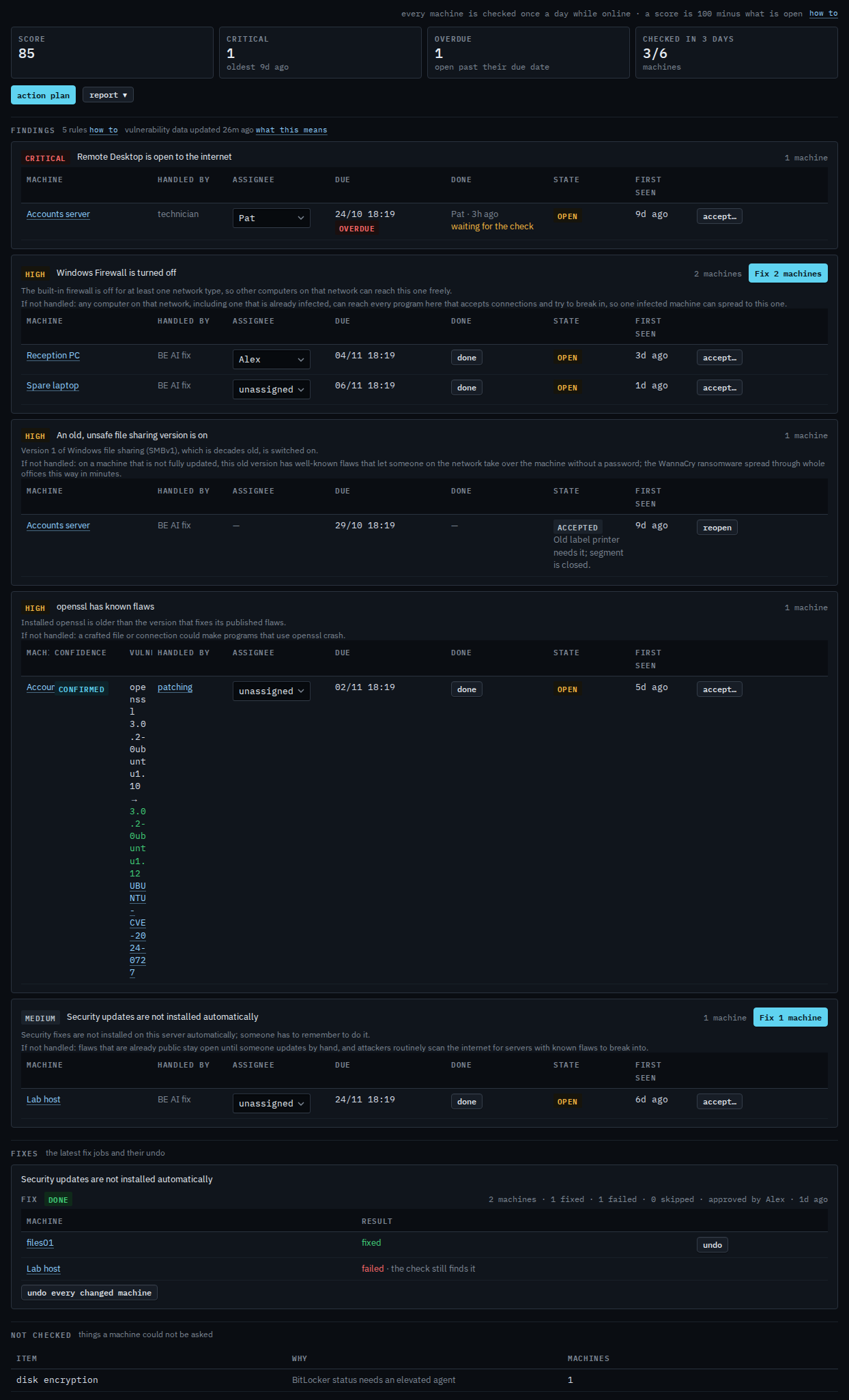
Every machine is checked once a day while it is online. The score is 100 minus what is still open; accepted findings do not count, and neither does a flaw with no fix out yet unless it is critical. Each finding says what is wrong, then what happens "If not handled", and each machine under it shows who handles it, who it is assigned to, and when it is due. Software with a known flaw shows as a vulnerability finding, with a confidence, the fixed version and links to the public records.
Open Security
Open Security. With one company you land on it; with several, the table lists each company's score, a 30-day line, open criticals, overdue findings, how many machines were checked in the last 3 days, and how long the oldest critical has been open. Press a company to open it. A company with the check switched off shows Security is off. On a company, overdue counts findings past their due date, action plan asks BE AI to write what to do first in a new conversation, and report opens the monthly PDF.
Fixing one finding on many machines: Fix a security finding on several machines. Assigning, due dates and done: Work through the security checklist. The monthly PDF: Get the monthly security report. Vulnerability findings: Read a vulnerability finding. One finding and what to do with it is Accept or reopen a security finding. Who can switch the check on is Switch the daily security check on.